Editors lose the most time at one moment: they know the take exists and they leave Premiere to go find it.
Drive tab, scrub, scrub, download, import, trim, back to the timeline. Ten minutes for one clip, 30 times per ad.
So I built the search into Premiere. Here's how it works and how to set it up:
What does the panel do?
The panel is a small window inside Premiere (Window → Extensions → BuildYourAds). You type what you need. It shows the matching segments from your library, each playing from the right second. You click Import and the segment shows up in a bin, already trimmed to the moment.
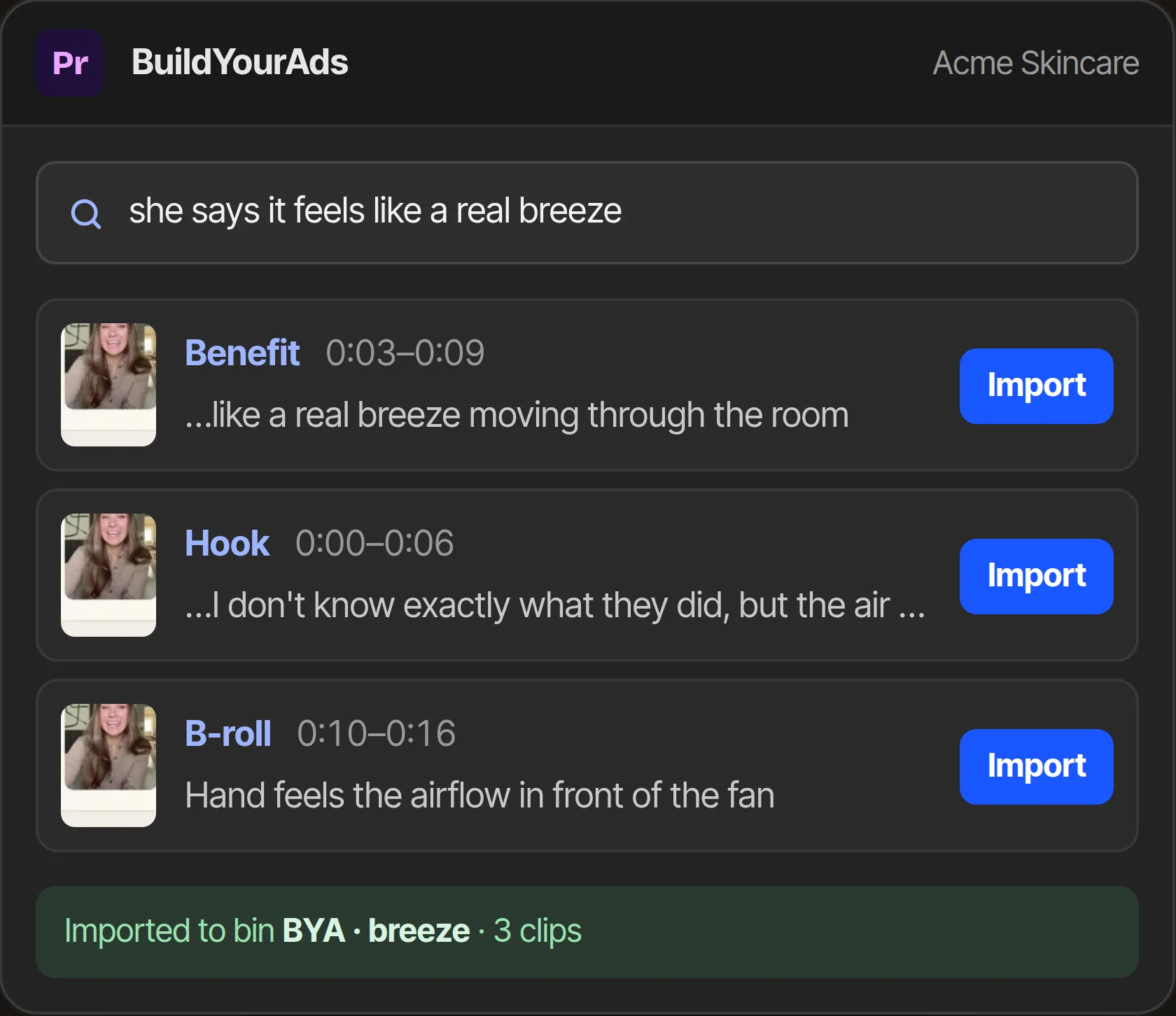
The panel. Search, click Import, the segments are in a bin.
Two search modes:
| Mode | When to use it | Example |
|---|---|---|
| Describe the shot | you know what you need, not how the creator said it | "dropper close-up, clean background", "creator skeptical then convinced" |
| Verbatim | the brief has the exact line | "I honestly thought this was a scam" |
Verbatim runs in three steps: exact phrase first, then the whole take that contains it, then close matches with a filler word in between. That order means a transcript hiccup doesn't hide a take.
How do I set it up?
Five minutes, once per machine:
- Download the panel from buildyourads.com/premiere. It's a zip with one folder inside.
- Put the folder in Premiere's extensions directory. The page has the exact path for Mac and Windows and a one-line command that does it.
- In BuildYourAds, go to Settings → API keys and create a key for the workspace. Paste it into the panel once.
- Restart Premiere. Window → Extensions → BuildYourAds.
The key is per workspace, so an agency editor switches brands by switching keys. Keys can be revoked from Settings any time, and revoking a key doesn't touch anyone's login.
How would I use it on a real edit?
Let's say the brief has three lines and two b-roll notes.
Line one is scripted, so verbatim:
I honestly thought this was a scam
Two creators said it. Import both takes. 10 seconds.
Line two is paraphrased in the footage, so describe it:
creator skeptical at first, then convinced, outdoors
Four segments. Import the two outdoor ones.
B-roll:
serum on cheek, morning light
Six results. Import three.
Then cut. Everything is in one bin, trimmed, named after the search. The finding part of the edit is done in about two minutes. The cutting part is the same as it always was, which is the part editors are actually good at.
What does it import, exactly?
A cut of the segment from the original file, at full quality, trimmed to the segment's in and out. Not the 480p preview. The preview is what streams in the panel while you browse, so results play instantly; the import pulls the real thing.
If you want more handle on either side, extend the clip in the timeline the normal way. The original is there.
What doesn't it do (yet)?
It doesn't build the timeline for you. That's the next thing we're working on: paste a script, get a rough cut as an XML with every take already placed and every pause removed, so you open it in Premiere and refine instead of assemble. The panel is the first half of that.
It also doesn't run in DaVinci or Final Cut today. The library works in any browser; the panel is Premiere only.
Your first two weeks
Week one: install it on one editor's machine. Have them do one real edit with it and write down every search that came back empty. Empty searches are missing labels or transcripts, and they're quick to fix in Settings.
Week two: every editor gets a key. Then try the verbatim mode on a scripted ad. Paste each line of the script, import the matches, cut. That's the workflow the rough cut will automate next, and it's worth seeing it by hand first.
FAQ
Does the panel work with DaVinci Resolve or Final Cut?
Not today. The panel is a Premiere CEP extension. The library itself works in any browser, and the rough-cut XML export (coming) imports into DaVinci and Premiere.
Does importing download the original file?
It pulls the segment as a cut from the original at full quality, not the 480p preview. The preview in the panel streams the proxy so browsing is instant.
Is the API key the same as my login?
No. It's a separate key with read access to one workspace, created and revoked in Settings. If an editor leaves, revoke the key; your login is untouched.
Which Premiere versions work?
Premiere Pro 2022 or newer, macOS and Windows. Older versions don't load CEP panels the same way.
Can two editors use the same key?
They can, but don't. Keys are free to create and one per person means you can revoke one editor's access without touching another's.
Do imports count against my credits?
No. Credits are only used when footage is analyzed. Searching, previewing and importing never cost credits.